
Most unresponsive thermostats are fixed by replacing batteries, checking the HVAC breaker and furnace power switch, or waiting through the compressor protection delay. Try those first. If you smell burning or a carbon monoxide alarm sounds, leave the house immediately and call emergency services instead of troubleshooting the system.
TL;DR:
- Most unresponsive thermostats are fixed by checking power sources, including batteries, circuit breakers, and the furnace switch, before considering replacement.
- A blank thermostat screen usually indicates a power loss, often due to dead batteries, a tripped breaker, or a faulty wall connection, especially with the common wire.
- Persistent blinking of “Cool On” or “Wait” beyond the compressor delay suggests wiring faults, a tripped breaker, or a control lockout rather than normal operation.
- Power cycling the thermostat and waiting 60 seconds can resolve many frozen or unresponsive units, but a complete replacement may be needed if problems persist.
- Emergency conditions like burning smells or carbon monoxide alarms require leaving the house immediately and calling emergency services instead of troubleshooting.
Table of Contents
- Quick action checklist for a thermostat that won’t turn on
- What your thermostat’s symptoms are telling you
- Checking the power supply and wiring behind the thermostat
- How to reboot or factory reset your thermostat
- When it’s time to call a licensed HVAC technician
- What patterns we see most often in service calls
- Getting your HVAC system fixed without the guesswork
- Where this troubleshooting advice comes from
- Sources
- FAQ
Quick action checklist for a thermostat that won’t turn on
Work through these steps in order. Most blank or frozen thermostats get fixed in the first two or three steps.
- Replace the batteries if your thermostat uses them, then reseat the faceplate firmly onto the wall base.
- Check the HVAC circuit breaker in your electrical panel and the power switch near the furnace or air handler, which looks like a standard light switch.
- Confirm the mode is set to Heat, Cool, or Auto with a reasonable setpoint, then wait 3 to 10 minutes in case the thermostat is running a compressor delay.
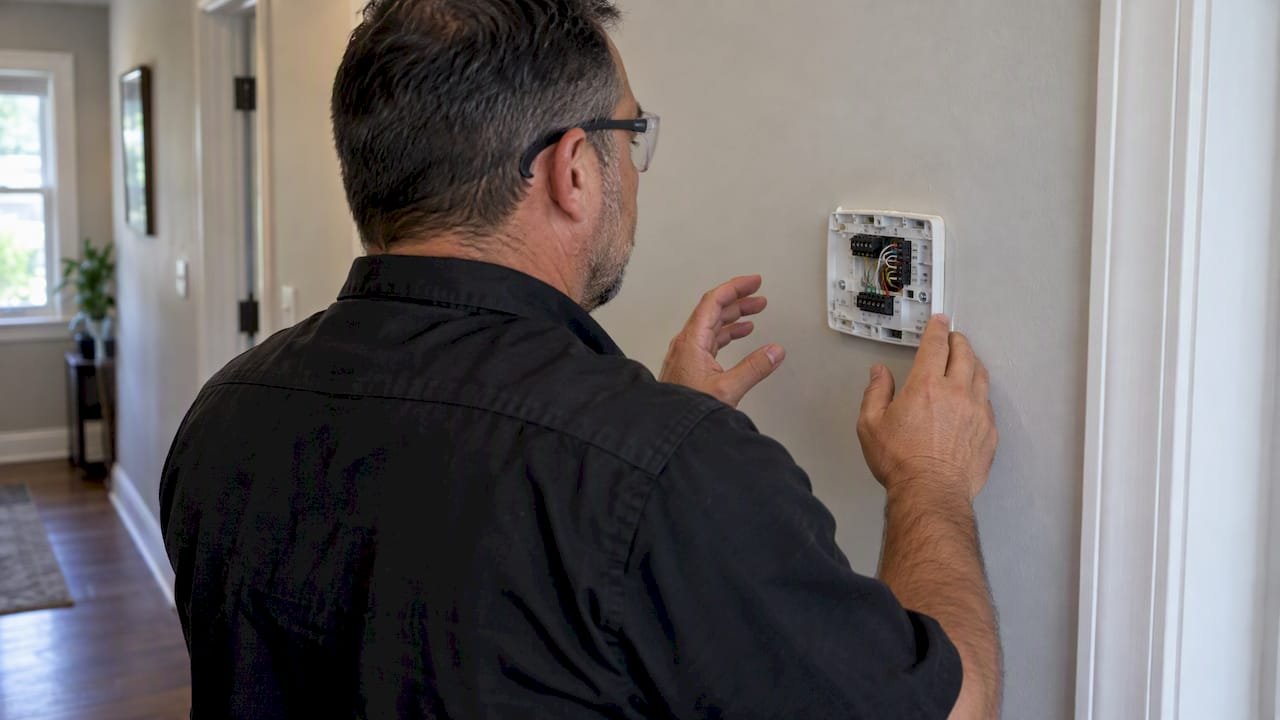
- Remove the faceplate and look for loose wires or bent pins without touching any exposed terminals.
- If the screen stays blank after confirming power, the thermostat or its wall base has likely failed and needs replacement.
Pro Tip: Write down what you tried and in what order before calling a technician. It cuts diagnostic time and often the cost of the visit.
What your thermostat’s symptoms are telling you
Different failure signs point to different causes, and matching the symptom to the cause saves you from repeating the same fix five times.
- A completely blank screen almost always means the thermostat lost power, whether from dead batteries, a tripped breaker, or the furnace switch being off, according to Carrier’s troubleshooting guidance.
- A blinking “Cool On” or “Wait” message is usually normal: it signals a built-in compressor protection delay that keeps the compressor from short-cycling.
- If that blinking continues well past the delay window, suspect a breaker, a wiring fault, or a unit lockout rather than a thermostat problem.
- A thermostat that shows the system running but produces no airflow usually points to an HVAC-side failure such as a bad igniter, blower, or contactor, not the thermostat itself.
- Clicking at the thermostat with no response from the furnace means the signal is leaving the thermostat fine, but the gas valve or control board isn’t acting on it.
- Bent or corroded pins on the thermostat’s wall base interrupt the connection and are worth checking visually before assuming an electronic failure.
The compressor delay runs 3 to 5 minutes in most systems, and Carrier notes that persistent blinking beyond that window usually signals a real fault rather than normal protection behavior. Repeatedly power-cycling the system during this delay can add wear to the compressor instead of fixing anything.
Checking the power supply and wiring behind the thermostat
Power and wiring issues cause the majority of “dead” thermostats, and most of these checks take less than five minutes.
- Go to your electrical panel and look for a tripped breaker labeled furnace, air handler, or HVAC. Reset it once; if it trips again immediately, stop and call a technician.
- Find the power switch near your furnace or air handler and confirm it’s in the on position. It’s easy to bump off during other work in that area.
- Swap the thermostat batteries even if they seem fine, then pull the faceplate off the wall base and check for corrosion or bent pins.
- Look at the wire labels (R, C, W, Y, G) where they enter the base and gently confirm each one is seated in its terminal.
The C, or common, wire deserves special attention on newer Wi-Fi thermostats. It provides a steady 24-volt power source so the display and radio stay on continuously. When that wire is missing or loose, you’ll often see intermittent blank screens, random reboots, or lost Wi-Fi connections rather than a single clean failure. A missing C-wire can sometimes be worked around temporarily with batteries or a C-wire adapter, but a permanent fix usually means running a new wire or adding a dedicated adapter kit.
Pro Tip: If you see exposed copper, frayed insulation, or any sign of scorching near the wiring, stop immediately and call a licensed technician. Don’t touch the terminals.
How to reboot or factory reset your thermostat
A simple power cycle resolves a surprising share of frozen or unresponsive thermostats.
- Set the thermostat to Off, then switch off the HVAC breaker at your panel.
- Wait a full 60 seconds before restoring power, which lets capacitors and control boards discharge completely.
- Turn the breaker back on, then select your mode and setpoint on the thermostat.
- Consider a factory reset only if the power cycle doesn’t help; it typically erases saved schedules and Wi-Fi credentials, so check your model’s manual for the exact button sequence.
- After any reset, give the system 3 to 10 minutes to pass through its compressor protection delay before deciding it hasn’t responded.
When it’s time to call a licensed HVAC technician
Some symptoms are beyond safe DIY territory, and others simply mean the checklist above has run its course.
- You’ve completed the power checks and reset steps above and the thermostat or system is still unresponsive.
- You notice exposed or frayed wiring, a burning smell, visible smoke, or a breaker that keeps tripping. Stop everything and call a professional.
- A carbon monoxide alarm goes off. CPSC guidance is direct on this: evacuate the house immediately and call emergency services rather than trying to diagnose the furnace first.
- The thermostat reports the system is on, but the furnace shows no ignition or the outdoor unit never kicks in. This pattern often points to a failed control board, contactor, or ignition component rather than anything you can fix at the thermostat.
When you call, have your symptoms, the steps you’ve already tried, any error codes on the display, and photos of the thermostat wiring ready if it was safe to take them. For a deeper look at what a technician actually checks during a visit, see our HVAC repair process guide.
What patterns we see most often in service calls
Across service calls, the same few issues repeat: dead batteries, a tripped breaker, a loose C-wire, or a failed control board. Technicians typically check safety first, then power, then wiring continuity, before moving to control-board diagnostics. Homeowners who document what they tried before the visit tend to get a faster, cheaper fix.
— MDTECH
Getting your HVAC system fixed without the guesswork
A thermostat that won’t respond after basic checks usually points to something inside the wall or the furnace cabinet, and that’s where a licensed technician earns their keep. Local professionals handle HVAC repair, thermostat replacement, and wiring fixes in the service area, with online booking to reduce waiting times.
On a typical service call, customers can expect a safety check first, a clear diagnosis of the issue, and a transparent quote before any repair work starts. For systems with more complex control wiring, our team also draws on resources like Encode’s controls service guidance when a fault traces back to the control board rather than the thermostat itself.
| What you get | Detail |
|---|---|
| Diagnosis | Safety check, power check, wiring check, then control-board testing |
| Quote | Provided before repair work begins |
| Booking | Online booking options may be available for HVAC repair appointments |
Book an HVAC repair appointment if your thermostat is still unresponsive after working through the checks above, or browse our general repair services if another appliance needs attention too.
Where this troubleshooting advice comes from
This guide draws on manufacturer troubleshooting pages from Carrier, CPSC safety guidance on carbon monoxide risk, and building science diagnostic practices.
Sources
- Common thermostat issues and how to troubleshoot | Carrier
- There’s a chill in the air — stay warm safely (CPSC)
FAQ
How do I fix an unresponsive thermostat?
Start with batteries, the HVAC circuit breaker, and the furnace power switch, since a blank screen almost always traces back to lost power according to Carrier’s guidance. If power checks out, power-cycle the thermostat and wait through any compressor delay before assuming it’s broken.
Why is my thermostat not communicating with the furnace?
A loose or missing C-wire is a frequent cause of intermittent communication on Wi-Fi thermostats, since that wire supplies the steady power the display and radio need. Loose connections at the wall base or a failing control board inside the furnace can also break the link between the two.
What are the first signs of a bad thermostat?
Early signs include a screen that won’t light up, buttons that don’t respond, or settings that reset on their own. A thermostat that clicks when you adjust it but never triggers the furnace is also a common early warning sign.
How do I reboot my thermostat?
Switch the thermostat off, turn off the HVAC breaker at your panel, and wait a full 60 seconds before restoring power. After power returns, give the system 3 to 10 minutes to pass through its compressor protection delay before deciding the reset didn’t work.
What should I do if my carbon monoxide alarm goes off near my furnace?
Leave the house immediately and call emergency services rather than trying to diagnose the heating system yourself, following CPSC safety guidance. Do not re-enter until the alarm clears and a professional confirms it’s safe.