
A KitchenAid dishwasher that leaves food on plates or barely sprays water is usually blocked, starved of hot water or overdosed with the wrong soap, not broken. KitchenAid’s own troubleshooting guide traces dirty dishes mostly to overloading, too much or the wrong detergent, the wrong cycle, or dirty parts. This guide walks you through those checks in the order that saves the most time, shows how to tell a simple fix from a failed pump, heater or control, and explains when a licensed technician should take over. If you live in Orange County or Los Angeles County, that technician can be us.
TL;DR
- Check the easy causes first: loading, detergent type and amount, cycle choice and a fully open water supply valve.
- Incoming hot water should be about 120°F (49°C). Colder water leaves grease and cloudy glasses.
- Clean the filter and make sure the spray arms spin freely and their holes are clear.
- Run the mug test to learn whether the pump is pushing water to the spray arms.
- Error lights, standing water after filter cleaning, or no spray after these checks mean it is time to book a technician.
Table of Contents
- Start with the checks that take five minutes
- Check the water temperature
- Clean the filter and spray arms
- When the dishwasher is not spraying water
- Detergent, rinse aid and suds
- Standing water means a drain problem
- Resetting your KitchenAid
- What to do, in order
- When to call a technician
- Our perspective
- FAQ
- Sources
Start with the checks that take five minutes
Before you touch any part, rule out the causes that account for most complaints. None of them needs tools.
Loading. The manual for the KUDS25SH and KUDC25CH models lists improper loading as a cause of poor cleaning. KitchenAid’s support page says to load soiled surfaces downward and inward, toward the spray arms. A large platter leaning against the door, or a cutting board in the lower rack, can block a spray arm or the detergent door, so one stray item can ruin a whole load.
Scrape, do not pre-rinse. The use-and-care manual for the KDTE554CSS says to scrape food off before loading but not to pre-rinse. Scrape off the solids and leave the film. That film gives the detergent something to work on.
Cycle choice. A quick or light cycle on baked-on lasagna pans will not do the job. Pick a heavier cycle for pots, and run a Normal cycle for everyday loads.
Water supply valve. KitchenAid’s support page says the water supply valve must be completely open. The valve usually sits under the kitchen sink. A half-closed valve is common after a faucet or disposal repair and gives you weak spray and poor cleaning.
Check the water temperature
Cold water is one of the most overlooked reasons for a dishwasher that runs fine but cleans badly. KitchenAid says dishwashers perform best with incoming hot water at 120°F (49°C), which helps dissolve detergent and break down grease. The KUDS25SH manual gives the same 120°F threshold for good cleaning.
The same support page lists the usual reasons for cold fills: a dishwasher connected to a cold-water line, a water heater set below 120°F, or a failed internal heating element or temperature sensor. Signs are cloudy glasses, leftover food residue and cycles that run longer as the machine tries to reach its programmed temperature.
A simple home check: run the kitchen faucet until the water is as hot as it gets, then start the dishwasher. If the dishwasher still turns out cool, greasy loads, the problem may be the water heater setting or the dishwasher’s own heating parts. Raising a water heater setting is a safety matter, because hotter water can scald. A failed heating element or sensor sits inside the machine and is a job for a technician.
The W10579121 manual adds a useful clue: the Sanitized indicator flashes if the cycle was interrupted or the water could not be heated to the required temperature. If your model has that light and it flashes, treat it as a temperature problem.
Clean the filter and spray arms
After loading and temperature, the filter and spray arms are the next suspects. A clogged filter is the most common culprit in the care guides, and a blocked spray arm starves the upper and lower racks alike.
The filter
KitchenAid says to clean the filter periodically, and to check your model manual first, because models with True Self-Cleaning Filtration work differently. Our page on what a dishwasher filter does and how to maintain it covers the basics.
- Turn off the dishwasher and, if you will reach into the pump area, disconnect power at the breaker or unplug it.
- Pull out the lower rack and find the filter assembly at the bottom of the tub.
- Remove and rinse it under warm water, clearing grit, seeds, bits of glass and food.
- Check the sump area under the filter for debris and labels. The KUDS25SH manual notes that labels can clog the spray arms or pump.
- Reinstall the filter exactly as it came out, fully seated.
The spray arms
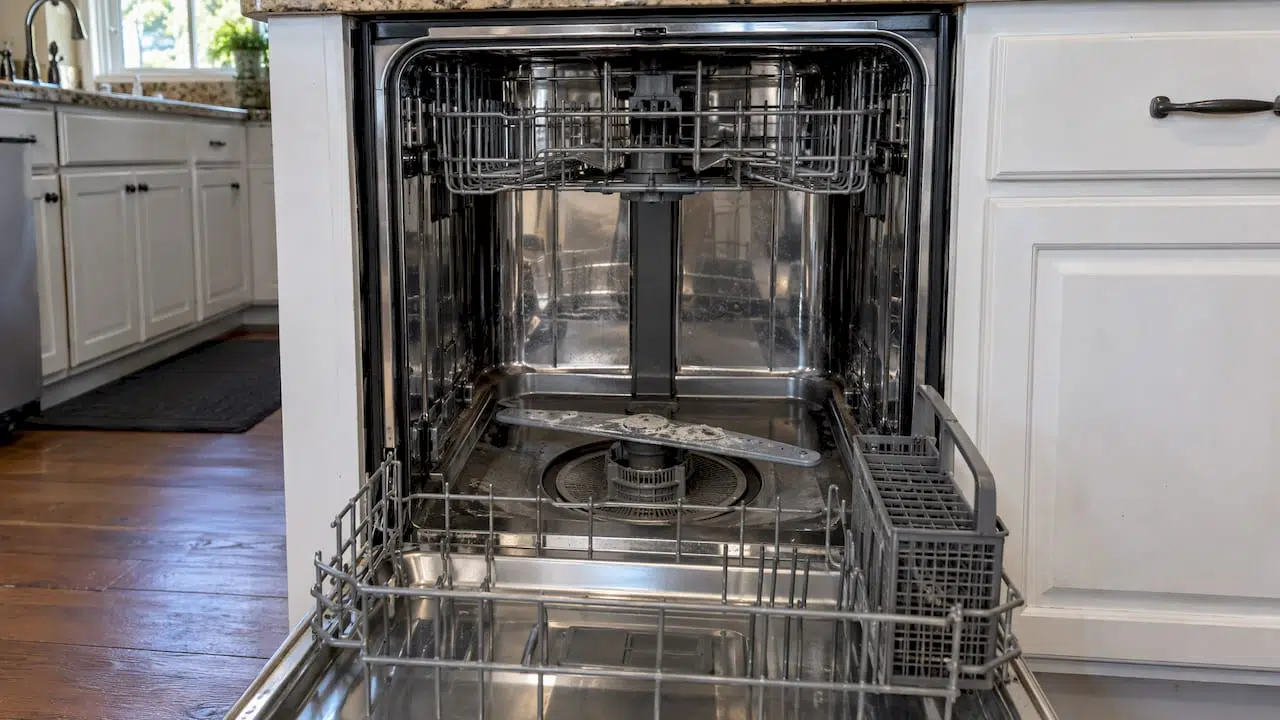
KitchenAid suggests spinning the middle spray arm by hand before you start a cycle to check for resistance. It should turn freely. If it catches, something is hitting it, or debris is in the hub. Look at the small holes along each arm and clear any food, seed or mineral buildup.
Hard water matters here. KitchenAid’s spray-arm page says mineral deposits from hard water can damage the dishwasher and impair cleaning. It recommends a water softener at 15 grains or more of hardness and a monthly dishwasher cleaning product such as affresh® Dishwasher Cleaner. The same page says a blocked spray arm can delay detergent release and soil removal. If you see white crusting around the holes, mineral buildup is likely.
For a wider routine, see our dishwasher care tips for homeowners.
When the dishwasher is not spraying water
“Not cleaning” sometimes means the machine is not moving water at all. Separate the causes with a few observations.
Is water getting in? KitchenAid says a failure to fill may come from an unlatched door or obstructions at the inlet valve, overfill float or water supply valve. Make sure the door latches firmly. The support page also says a misinstalled anti-flood device can stop water from flowing into the dishwasher. That shows up after a new installation or a repair under the sink.
Is the pump pushing water to the spray arms? The Whirlpool/KitchenAid filtration technical manual describes a simple mug test. Place mugs or glasses upright in the middle and lower racks, run a Normal cycle for 10 to 15 minutes, then look. Water in the mugs means the pump is working. If the mugs are dry, water is not reaching the spray arms, which points to the pump, the filters or the spray arms themselves.
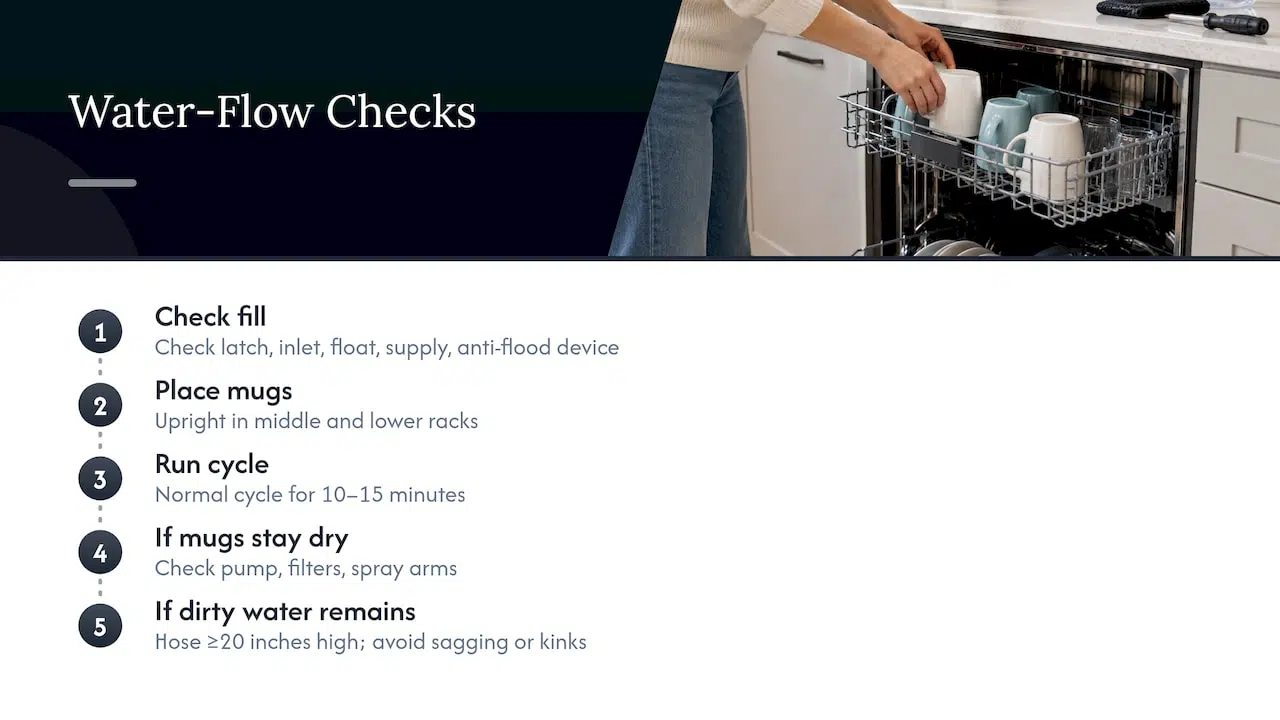
This is how a service technician starts: observe flow first, then inspect parts with power disconnected. If your mugs are empty after you have cleaned the filter and cleared the spray arms, stop there. The remaining suspects, the pump and its internal passages, are not worth opening up yourself.
Is there a drain hose problem? KitchenAid says the drain hose should be at least 20 inches above the floor. A hose that sags or kinks can keep dirty water in the tub, so the next cycle washes with greasy water.
Detergent, rinse aid and suds
Detergent is cheap to change and easy to get wrong.
- Amount. The W10579121 manual says the right amount depends on soil and water hardness. Too little in hard water leaves dishes unclean. Too much in soft water can etch glassware.
- Type. The KDTE554CSS manual warns that suds from the wrong detergent, such as laundry detergent, hand soap or dish soap, can make the sensing system stop the dishwasher from operating properly or filling with water. An unsealed rinse-aid cap or excess detergent can do the same.
- Rinse aid. The manual calls rinse aid essential for good drying. If wet, spotty dishes are your main complaint, our guide on dishwasher not drying goes deeper.
If you suspect suds, a machine that seems to “not fill” or “not clean” may simply be reacting to foam. Remove the foam, wipe the tub, and run a cycle with the correct dishwasher detergent in a measured amount.
Quick symptom guide
| What you see | Most likely cause | First thing to try |
|---|---|---|
| Food residue on all racks | Clogged filter, blocked spray arm, overloading | Clean the filter, spin the spray arm, reload |
| Greasy film, cloudy glasses | Water below 120°F, too little detergent | Run the tap hot first, check detergent amount |
| Dry mugs in the mug test | Pump, filter or spray arm flow problem | Clean the filter and arms, then call a technician |
| Dishes unclean, foam in the tub | Wrong or too much detergent, open rinse-aid cap | Use dishwasher detergent only, seal the cap |
| Water left in the tub | Drain blockage | Clean the filter, check the hose and disposal |
| Clean light blinking four times | Detected error | Call for service |
Standing water means a drain problem
Dishes will not come out clean if the tub does not empty between stages. KitchenAid says up to an inch of water after a cycle is normal, but more may indicate a blockage. It says owners can clean the filter, and that a clogged drain that persists after filter cleaning should be handled by a licensed professional.
The technical manual’s no-drain advice begins with unplugging the dishwasher, then checking for blockages from the drain motor to the home plumbing. That includes a plugged garbage disposal, an unremoved disposal knockout plug, plugged hoses and a stuck drain check valve. If you recently had a new disposal installed and the problem began then, the knockout plug is a likely cause. Our page on dishwasher drain fixes explains the same chain of checks, and if water is escaping rather than staying, see stopping dishwasher overflows.
Resetting your KitchenAid
A reset clears a confused control, not a dirty filter. For the model covered by the W10579121 manual, you press and hold CANCEL/DRAIN twice to reset, then select your cycle and options and press START/RESUME. Check your own model’s manual for the exact steps, since control panels differ.
Read the lights too. The same manual says blinking LEDs mean a paused or door-interrupted cycle. A Clean/Complete light that blinks four times in a row with pauses means the dishwasher has detected an error and locked out its controls, and you should call for service. Do not keep resetting a locked-out machine. If it stops mid-cycle repeatedly, see why a dishwasher stops mid cycle.
What to do, in order
For a full walkthrough, our dishwasher troubleshooting steps cover the sequence in more detail. In short:
- Reload with soiled sides facing the spray arms and no blocked arms or detergent door.
- Confirm the water supply valve is fully open.
- Run the tap hot, then check detergent type and amount, and that the rinse-aid cap is sealed.
- Clean the filter and clear the spray arms.
- Run the mug test.
- If there is standing water, check the drain hose and disposal.
- If a reset does not help, or lights show an error, book service.
When to call a technician
Stop and call when the mug test shows no flow after cleaning, when water stays in the tub after the filter is clean, when dishes stay cold-washed even with a hot supply, or when error lights lock the controls. Each of those points to a part inside the machine, such as the pump, inlet valve, heating element, temperature sensor or control board. Opening a dishwasher’s electrical and pump sections is also where a small problem can become a leak or a shock risk, and KitchenAid’s guide directs owners to the model-specific manual before attempting electrical or mechanical work.
If you are in Orange County or Los Angeles County, our licensed technicians handle dishwasher and other kitchen appliance repairs, and you can book online. See our kitchen appliance repair service, or check the brands we repair and install.
When you book, tell us the model number from the door frame or tub edge, what the dishwasher does, which of the checks above you already did and whether any lights are blinking. That gives the technician a head start. You can start from our appliance repair services page or our homepage.
Our perspective
Most “not cleaning” calls start the same way: the owner assumes the machine has died, when the dishes are really telling them about water, flow or soap. We agree with the order that the manufacturer’s service documents set out: look at what you can observe, then test, then open things up. The mug test is a good example. It takes ten minutes and tells you whether the pump is moving water.
We also think the line between a homeowner check and a repair matters. Loading, detergent, a clean filter and a free-spinning spray arm are yours to handle. A pump that does not push water, a heating element or sensor that fails, a drain that stays blocked after the filter is clean, or a control that blinks an error are not. Those need a licensed technician who can work safely around the electrical and plumbing connections.
Our team repairs kitchen appliances across Orange and Los Angeles counties, including major and luxury brands, and we put clear communication and safety first. If your KitchenAid is still leaving dishes dirty after the checks in this guide, book a visit and let us find the cause.
MDTECH
FAQ
Why is my KitchenAid dishwasher not cleaning dishes?
The usual causes are overloading, too much or the wrong detergent, the wrong cycle, or dirty parts such as a clogged filter or spray arm, according to KitchenAid’s troubleshooting guide. Water below 120°F can also leave grease behind. If those are clear and the problem remains, a pump, heater or sensor fault is likely.
Why is my KitchenAid dishwasher not spraying water?
First confirm the door latches and the water supply valve is fully open. Then clean the filter, check that the spray arms turn freely and run the mug test. If the mugs stay dry, the pump or its passages need a technician.
Where is the filter in a KitchenAid dishwasher?
It sits at the bottom of the tub, under the lower rack. Some models have True Self-Cleaning Filtration, so check your model’s manual before removing anything. Our page on what a dishwasher filter is explains how filters work.
How do I reset my KitchenAid dishwasher?
On the model covered by the W10579121 manual, press and hold CANCEL/DRAIN twice, then pick a new cycle and press START/RESUME. Your own model’s manual gives the exact method. If the Clean light blinks four times in a row, the controls are locked out and the unit needs service.
Can the wrong detergent stop my dishwasher from cleaning?
Yes. Laundry detergent, hand soap or dish soap can create suds, and the KDTE554CSS manual says foam can make the sensing system stop the dishwasher from filling or operating properly. Use dishwasher detergent in the measured amount.
Sources
- How To Troubleshoot a Dishwasher: Issues and Solutions, KitchenAid
- Models KUDS25SH and KUDC25CH owner’s manual, KitchenAid
- Spray Arm Not Working, KitchenAid product help
- Food Residue Remains on Dishes, KitchenAid product help
- Dishes are not Clean, KitchenAid product help
- Technical manual W11480208 Rev A, dishwasher filtration
- Dishwasher User Instructions W10579121, KitchenAid
- KitchenAid KDTE554CSS Use and Care Manual
- Dishwasher Water Temperature Troubleshooting, KitchenAid product help